You don't have javascript enabled. Good luck with that. LicenseCommerce - KrishaStore

Subscribe to our newsletter and enjoy up to 15% OFF on every product and exclusive offers.

LicenseCommerce

LicenseCommerce generates license keys automatically, validates them in real time, and keeps every customer's access in sync with their subscription. You focus on building your product. The plugin handles who's allowed to run it.
LicenseCommerce

Why LicenseCommerce Manager?

Built for teams who sell software on WooCommerce and need to know exactly who's licensed, on how many sites, and for how long, without policing it by hand.

  • Auto-generate and deliver license keys on every sale.
  • Stripe sync keeps licenses in step with billing.
  • REST API and SDK for real-time validation.
  • Sell subscriptions, lifetime, multi-site, and support plans.

How It Works

Get your first license issued in minutes, with a simple three-step setup.

1

Install & Connect

Add LicenseCommerce to your WooCommerce store and drop the included SDK into your own plugin or software. Point it at your store, and your product can validate license keys in real time.
2

Configure Your License Rules

Set activation limits, plan type, and renewal terms per product. Sell subscriptions, lifetime licenses, or multi-site plans, each with its own rules.
3

Automate & Monitor

Keys are issued, validated, and kept in sync with each subscription automatically, while you track every license from a single dashboard inside WordPress.

Features

Everything you need to issue, track, and protect your software licenses, from one place.

Automatic License Key Generation

Every WooCommerce sale generates and assigns a unique license key to the customer, with no manual work. Map licenses to a product once, and every future sale is handled for you.

Real-Time Validation via REST API & SDK

A REST API and a plug-and-play developer SDK let your software validate a key the instant a customer enters it, and get back a clear answer: valid, expired, or invalid. The SDK ships with a sample Composer setup and an integration guide, so wiring it in is configuration, not a build project.

Stripe Subscription Sync

License status follows the Stripe subscription lifecycle. When a subscription is activated, renewed, or canceled, the matching license updates automatically. LicenseCommerce reads your Stripe details from your existing WooCommerce Stripe settings, so there's nothing extra to configure, and one-time or lifetime licenses work even without Stripe.

Automatic Renewal Reminders

A native WooCommerce email reminds customers before a license expires, so renewals never catch them off guard. Schedule multiple reminders (30, 7, and 1 day before renewal by default), edit the content freely, and send yourself a test before turning it on.

Max Site Activations

Cap how many websites a single license key can activate at once, ideal for multi-site plans aimed at agencies, freelancers, and businesses. Set the limit per plan.

Multi-Product & Flexible Plans

Manage licenses for an unlimited number of products and pricing tiers from one account. Sell monthly, quarterly, or yearly subscriptions, one-time lifetime licenses, and an optional paid-support add-on that bills on the subscription cycle.

Central License Dashboard

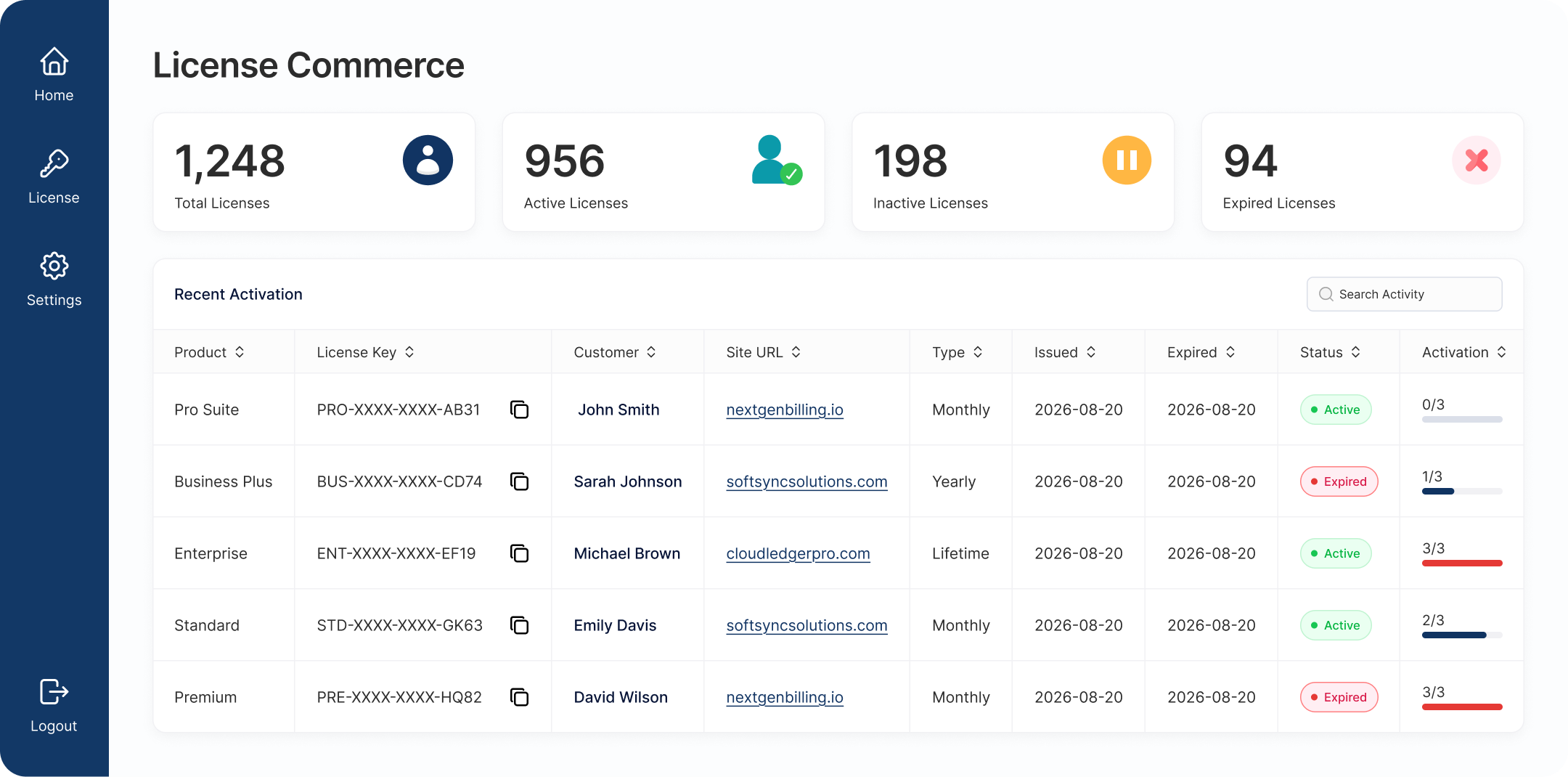
See total, active, expired, and inactive licenses at a glance, and search or filter by status, type, customer, site URL, and date. Every license and its activations are visible and manageable in one screen.

Guided Onboarding Wizard

A 6-step Getting Started wizard checks your environment, links straight to anything that needs fixing, and walks you through licensing a product, connecting Stripe, and managing customers, so you're set up correctly the first time.

Customer License Dashboard

Customers view and manage their own licenses right inside their WooCommerce account. A dedicated Licenses tab under My Account shows each license key, its status, activations, expiry, and plan, so buyers self-serve and your support load drops.

Integration Guide

Six quick steps to wire the SDK into your WordPress plugin.

STEP 01

Install the SDK

Add the SDK to your plugin using Composer, or copy the lfi folder in manually. Both setups are fully supported.

Supports

Composer Manual Copy

Need the standalone autoloader instead? See Step 03 for both options.

# Add the SDK to your plugin
composer require krishastore/licenseflow-sdk
				
# Then generate the autoloader
composer dump-autoload
# Copy the SDK folder into your plugin
cp -r lfi your-plugin/vendor/lfi

Requires PHP 7.4 or higher.

STEP 02

Rename the Namespace

The SDK runs as a singleton, so if you bundle it inside more than one plugin, each copy needs its own namespace — otherwise the two plugins collide and only one license check works correctly.

Important: two plugins should never share the same LFI\... namespace.

// src/LicenseManager.php
// Before
namespace LFI\License;
								
// After — use a prefix unique to your plugin
namespace LFI\YourPlugin;

Update every file in src/ that references the old namespace.

STEP 03

Configure Autoloading

If your plugin already has a root composer.json, merge the SDK's namespace into its psr-4 map. No root composer.json? Use the SDK's own instead.

Supports

Root composer.json Standalone

{
  "autoload": {
	"psr-4": {
	    "YourPlugin\\": "./src",
	   "LFI\\YourPlugin\\": "vendor/krishastore/licenseflow-sdk/src/"
	}
  }
}
									
// vendor/krishastore/licenseflow-sdk/composer.json
{
  "autoload": {
	 "psr-4": {
		"LFI\\YourPlugin\\": "src/"
	 }
  }
}
									

Then run composer dump-autoload.

STEP 04

Initialize the Singleton

In your main plugin file, require the autoloader and initialize the SDK with your product SKU, admin menu slug, plugin name, and template directory.

use LFI\YourPlugin\LicenseIntegration;

require_once __DIR__ . '/vendor/autoload.php';

LicenseIntegration::instance()
	->set_sku( 'your-product-sku' )
	->set_parent_slug( 'your-plugin-menu-slug' )
	->set_plugin_name( 'My Plugin' )
	->set_template_dir( plugin_dir_path( __FILE__ ) . 'license-templates/' );
STEP 05

Check the License

Use is_pro() anywhere in your plugin to verify the license is active and not expired before enabling premium features.

Tip: prefer is_pro() over is_active() for feature gating — same behavior, clearer intent.


if ( LicenseIntegration::instance()->is_pro() ) {
	// enable premium features
}
							
STEP 06

You're All Set

Your plugin now issues, validates, and renews licenses automatically. Use these methods anywhere you need license data.

  • is_active(): bool — alias of is_pro()
  • get_status(): string — raw status: active, inactive, expired, invalid
  • get_status_text(): string — formatted status text (HTML + color)
  • get_license_key(): string — the stored license key
  • get_activated_site(): string — URL where the license is activated
  • get_menu_slug(): string — admin menu slug for this instance

Simple, Transparent Pricing

Choose the plan that fits your business. All plans include with 1 year standard support.

Monthly
$29.99 $35 /month
  • Complete LicenseCommerce Features
  • WooCommerce & Stripe Integration
  • License & Subscription Management
  • License Activation & Validation
  • Developer SDK for Plugin Integration
  • Automated Email Reminders
  • Updates, Security & Standard Support
Yearly
$199.99 $249 /year
  • Complete LicenseCommerce Features
  • WooCommerce & Stripe Integration
  • License & Subscription Management
  • License Activation & Validation
  • Developer SDK for Plugin Integration
  • Automated Email Reminders
  • Updates, Security & Standard Support
Lifetime
$299.99 $349 /Lifetime
  • Complete LicenseCommerce Features
  • WooCommerce & Stripe Integration
  • License & Subscription Management
  • License Activation & Validation
  • Developer SDK for Plugin Integration
  • Automated Email Reminders
  • Updates, Security & Standard Support

Frequently Asked Questions

Find answers to common questions about LicenseFlow Manager.

Yes. LicenseFlow Manager connects to popular payment and checkout platforms, and our webhooks let you issue or revoke licenses automatically the moment a payment succeeds, renews, or refunds.
Yes. Every plan includes full REST API access, official SDKs for PHP, Node.js, and Python, and a sandbox environment for testing integrations before going live.
You control the behavior: automatically send renewal reminders, gracefully downgrade access, or block activation entirely. Expiration rules are configurable per product and per plan.
Yes, every plan starts with a 14-day free trial, no credit card required. You can generate and test real license keys during your trial period.
Growth plans include priority email support with a same-business-day response target. Enterprise plans add a dedicated support manager and 24/7 coverage.

Start selling licensed software the right way.

LicenseCommerce gives you the full licensing layer, key generation, real-time validation, Stripe sync, and renewal reminders, on top of the WooCommerce store you already run.